Getting Started
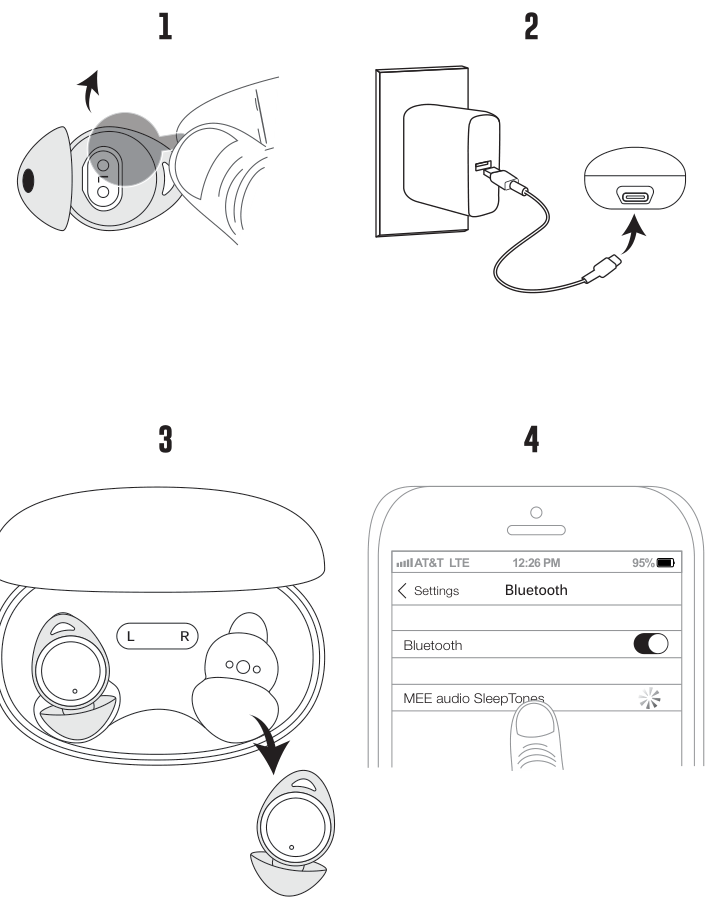
- Remove the protective film and return the earpieces to the case.
- Charge for 2 hours.
- Remove the earpieces and place them in your ears.
- Open your device's Bluetooth menu and select MEE audio SleepTones.
Installing Ear Sleeves
The SleepTones include two colors of ear sleeves. Contrasting ear sleeves on the left and right earpieces can be used for easier identification in the dark.
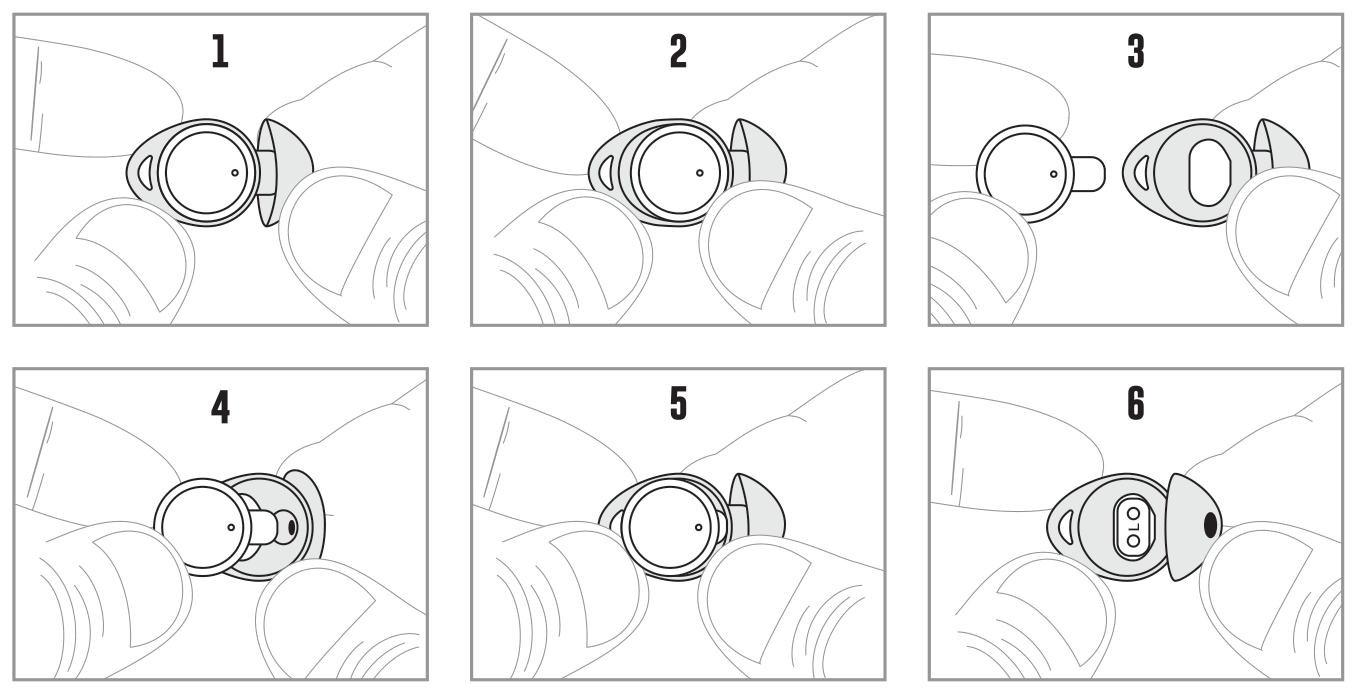
Install the sleeves as shown. Make sure they are installed securely before use.
- Hold the earpiece with the touch control panel facing you.
- Slide the old silicone sleeve off, starting from the back.
- Position the new sleeve with the opening facing the earpiece.
- Insert the earpiece nozzle first into the new sleeve.
- Gently pull the sleeve over the rest of the earpiece.
- Adjust the sleeve so it aligns around the charging pins and touch control panel.
The correct sleeves for your ear will allow the earpieces to fit flush, reduce outside noise, and provide good bass response.
↑ Back to topControls
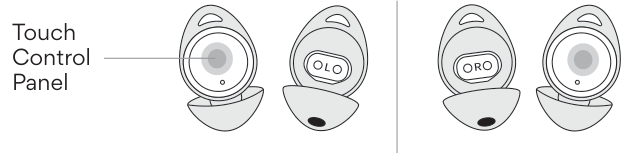
Each earpiece has a Touch Control Panel. Use the gestures below to control playback, calls, and features. Where the left and right earpieces perform different actions, both are listed.
| Gesture | Left Earpiece | Right Earpiece |
|---|---|---|
| Tap 1× | Volume down | Volume up |
| Tap 2× | Play / Pause / Answer phone call / Hang up | |
| Tap 3× | Enable / Disable Sleeping Mode | |
| Tap 4× | Activate Siri® / Google Assistant™ | |
| Tap 4× (while in Sleeping Mode) | Enable / Disable 1-hour Sleep Timer | |
| Tap 6× | Clear memory and enter pairing mode | |
| Press and hold 2 seconds | Previous track | Next track |
| Press and hold 5 seconds | Turn both earpieces off | |
| Press and hold 5 seconds (while off) | Turn left earpiece on | Turn right earpiece on |
Charging Case Battery Indicator
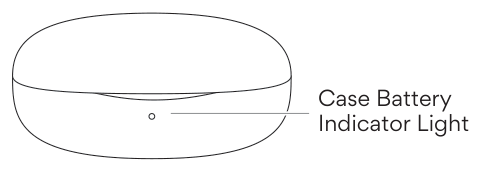
Checking Remaining Battery
To check the battery level of your case at any time, make sure the charging cable is not plugged in, then remove and replace one or both earpieces to activate the battery indicator light.
| Indicator Light | Case Battery Level |
|---|---|
| Solid light | Above 20% |
| Flashing light | Below 20% |
| No light | 0% |
While Charging
| Indicator Light | Status |
|---|---|
| Flashing light | Charging |
| Solid light | Fully charged |
Pairing a New Device
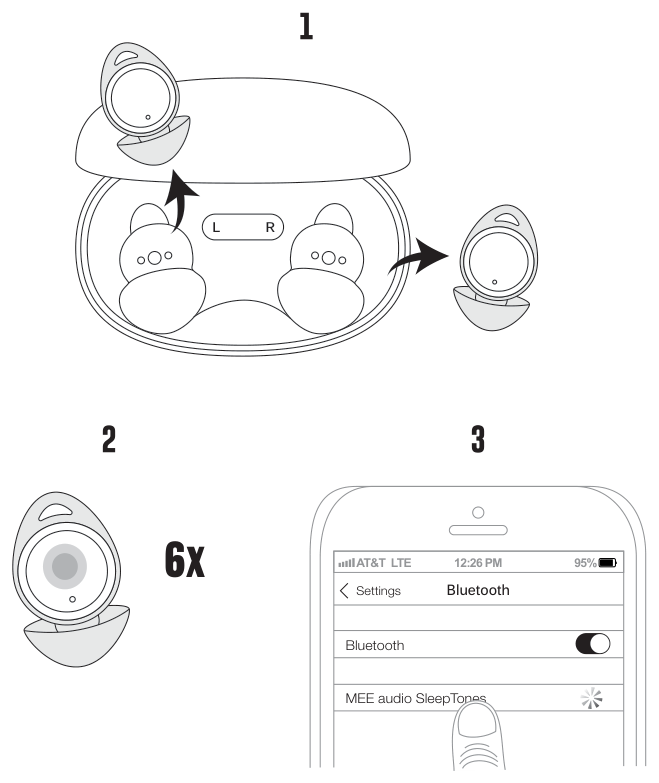
To clear existing pairings and connect a new device:
- Take out both earpieces and put them in your ears.
- Tap either side 6 times to clear pairings. If successful, you will hear a voice prompt.
- Open your device's Bluetooth menu and select MEE audio SleepTones.
Sleeping Mode
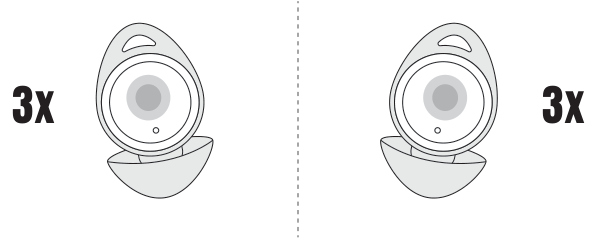
Sleeping Mode turns off all lights, playback controls, and voice prompts on the earbuds to reduce distractions while you sleep. Be sure to set your desired volume level before enabling Sleeping Mode, or adjust it using the volume controls on your phone or Bluetooth device once in Sleeping Mode.
Enable / Disable Sleeping Mode: Tap the touch panel on either earpiece 3 times.
Note: Sleeping Mode does not prevent notifications and other audio from your phone or Bluetooth device — check your device's notification settings for details.
Sleep Timer
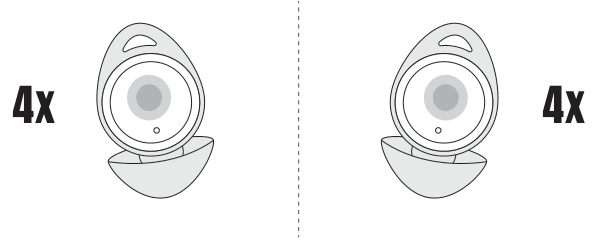
The Sleep Timer will power off your SleepTones automatically after approximately 1 hour, conserving battery and ensuring your sleep sounds stop naturally once you've drifted off.
Enable / Disable Sleep Timer: Tap the touch panel on either earpiece 4 times while in Sleeping Mode.
Note: Sleeping Mode and the Sleep Timer reset after each power-off. You will need to re-enable them every time you use your SleepTones.
Troubleshooting
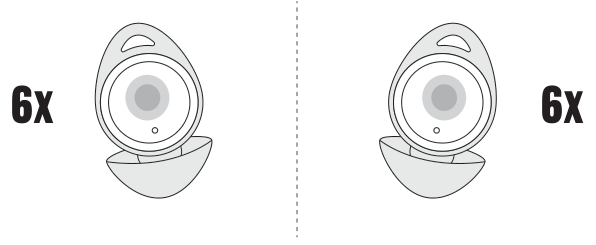
Most issues can be solved by resetting the SleepTones and creating a new pairing with your device.
Factory Reset / Clear Memory: Tap the touch panel on either earpiece 6 times.
Note: Resetting will restore all settings to their original factory defaults and erase all previous Bluetooth pairings. You'll need to delete the MEE audio SleepTones from your Bluetooth device list and create a new pairing before using it again.
Additional Support
Setup Video
Scan the QR code on the packaging or visit MEEaudio.com/SleepTonesBTsupport.
Questions? We're Here to Help!
Phone Support: 626-965-1008
Monday – Friday, 9:00 am to 5:00 pm PST
Email Support: support@meeaudio.com
All emails are responded to within 2 business days.
Care Instructions
After Each Use
Wipe the charging contacts on the earbuds and carrying case with a soft cloth or cotton swab. Use diluted soapy water if needed. Do not use chemical cleaners. Allow the earpieces and case to dry completely.
If the earphones or charging case come in contact with liquids, quickly wipe them away. Do not place the earpieces into the charging case with water or sweat on them.
If submerged in water, do not turn on until completely dried.
Note: Liquid submersion voids the warranty.
Every 1–2 Months
Remove the ear sleeves and use a soft cloth or cotton swab moistened with alcohol or diluted soapy water to clean the speaker grille. If there is dust or debris inside the speaker grille, it can be removed with adhesive tape or with a soft-bristled toothbrush. Keeping the speaker grille free of debris and earwax is key to maintaining the volume and audio performance of your earphones.
The lifetime of the battery will be significantly reduced if the battery is not charged for a long time. Charge at least once a month to maintain battery health.
↑ Back to topWarranty
MEE audio products purchased from authorized resellers are covered by a 1-year manufacturer warranty (2 years in the EU).
For more information, contact your local MEE audio dealer or visit MEEaudio.com/support.
↑ Back to topWarning – Important Safety Instructions
For your safety, please read these important safety instructions before operating the product. Follow the instructions in this user guide carefully to prevent injury to yourself and damage to the product.
⚠ CAUTION – Choking hazard. Keep the device and packaging out of reach of children and pets. This product may pose a choking hazard and should not be used by children. The Lithium-Ion battery contained in this product may be hazardous if swallowed. Seek immediate medical attention if an earpiece is ingested.
Medical & Health
- Magnetic material inside. If you have any medical implants, consult your physician regarding potential interference before use.
- Do not use headphones if you have an ear infection. Consult your physician prior to use if you have an ear infection or any drainage from your ear(s).
Safe Use
- Do not use headphones while driving, cycling, operating machinery, or during any activity that requires full awareness of your surroundings. The noise isolation may block out or alter important sounds like traffic, alarms, or warning signals, potentially putting you or others at risk. Use only in safe environments where reduced hearing will not compromise safety.
- Local laws may restrict the use of headphones in traffic. Always obey local laws.
- Listening to audio at high volumes for extended periods can cause permanent hearing damage. To protect your hearing, always keep the volume at a moderate or low level. When connecting your headphones, start with the volume turned all the way down, then slowly increase it to a comfortable level.
Battery & Charging
- To charge this product, use only chargers approved by your local regulatory agency (e.g., UL, CSA, CE, IEC), or a computer.
- Do not charge or use around flammable gases, liquids, or dust, as fire or explosion may occur.
- Battery performance will be severely decreased if stored in extreme temperatures. Avoid extreme temperatures below −10°C / 14°F or above 45°C / 113°F, including direct sunlight.
- Danger of explosion or fire if batteries are damaged. Never attempt to open the battery for any reason. Do not use the device if it has been crushed, pierced, or otherwise damaged in any way that could compromise the battery. Do not leave the device in any location with excessive heat, including naked flames or near heat sources such as radiators and stoves. Do not expose the battery to spark, flame, or salt water.
Service & Modifications
- There are no user-replaceable or user-repairable parts in the device. Disassembling it will void your warranty and may cause personal injury, including fire or electric shock.
- Changes or modifications to this unit not expressly approved by MEE audio could void the user's authority to operate the equipment.
- Only use attachments and accessories specified by the manufacturer.
MEE audio reserves the right to update or improve its products and user guides without notice. Please visit meeaudio.com to download the latest version of these instructions and for the most up-to-date product information.
↑ Back to topCompliance Information
FCC Statement
This device complies with part 15 of the FCC Rules. Operation is subject to the following two conditions: (1) This device may not cause harmful interference, and (2) this device must accept any interference received, including interference that may cause undesired operation.
FCC Rules
This equipment has been tested and found to comply with the limits for a Class B digital device, pursuant to part 15 of the FCC Rules. These limits are designed to provide reasonable protection against harmful interference in a residential installation. This equipment generates, uses and can radiate radio frequency energy and, if not installed and used in accordance with the instruction manual, may cause harmful interference to radio communications.
However, there is no guarantee that interference will not occur in a particular installation. If this equipment does cause harmful interference to radio or television reception, which can be determined by turning the equipment off and on, the user is encouraged to try to correct the interference by one or more of the following measures:
- Relocate the receiving antenna.
- Increase the separation between equipment and receiver.
- Connect the equipment into an outlet on a circuit different from that to which the receiver is connected.
- Consult the dealer or an experienced radio/TV technician for help.
FCC ID: 2ABMR-ST1BT
EU / UK Declaration of Conformity
S2E, Inc. dba MEE audio hereby declares that this wireless device is in compliance with Directive 2014/53/EU and Radio Equipment Regulations 2017. The full text of the EU declaration of conformity is available at meeaudio.com/compliance.
- Operating frequency range: 2402–2480 MHz
- Maximum transmission power: <20 dBm
Availability of Replacement Parts, Repair Services, and Maintenance Information (Québec Consumers)
In accordance with the Consumer Protection Act (Québec) and its regulations, we provide the following information regarding the availability of replacement parts, repair services, and information necessary to maintain and repair this product:
- Replacement parts: Partially available. Available replacement parts include the replacement charging cable, replacement charging case, and replacement earpieces.
- Repair services: Not available.
- Maintenance and repair information: Not available.
Replacement parts that we make available are designed to be installed using commonly available tools.
For more details or to request support, please visit meeaudio.com/qc-repair-disclosure or contact us at:
MEE audio
817 Lawson St.
Industry, CA 91748 USA
+1-626-965-1008
support@meeaudio.com
Disposal and Recycling
Dispose of this product in accordance with all local laws and regulations. Because this product contains electronic components and a battery, it must be disposed of separately from household waste. Contact local authorities to learn about disposal and recycling options.
↑ Back to topProduct Information
Manufacturer / Importer
S2E, Inc. dba MEE audio
817 Lawson St.
Industry, CA 91748 USA
sales@meeaudio.com
- Product Name: SleepTones
- Model: EP-ST1BT
- Brand: MEE audio
- Made in China
EU Authorized Representative (EC REP)
Lenco SAS
18 Rue des Bas Rogers
92800 Puteaux, France
hqsy@lenco.eu
MEE audio, the MEE audio logo, and SleepTones are registered trademarks of S2E, Inc. All rights reserved. All other trademarks are the property of their respective owners.
The Bluetooth® word mark and logos are registered trademarks owned by Bluetooth SIG, Inc. and any use of such marks by MEE audio is under license. Other trademarks and trade names are those of their respective owners.
Siri® is a registered trademark of Apple Inc. Google Assistant™ is a trademark of Google Inc.
↑ Back to top